SERCOCAN V2 / HANDLEBAR CONTROLS
Familiar controls.
More at your fingertips.
Use this V2 reference to find the switch, dimming and flash functions. Match the instructions to your installed controller version.
QUICK REFERENCE
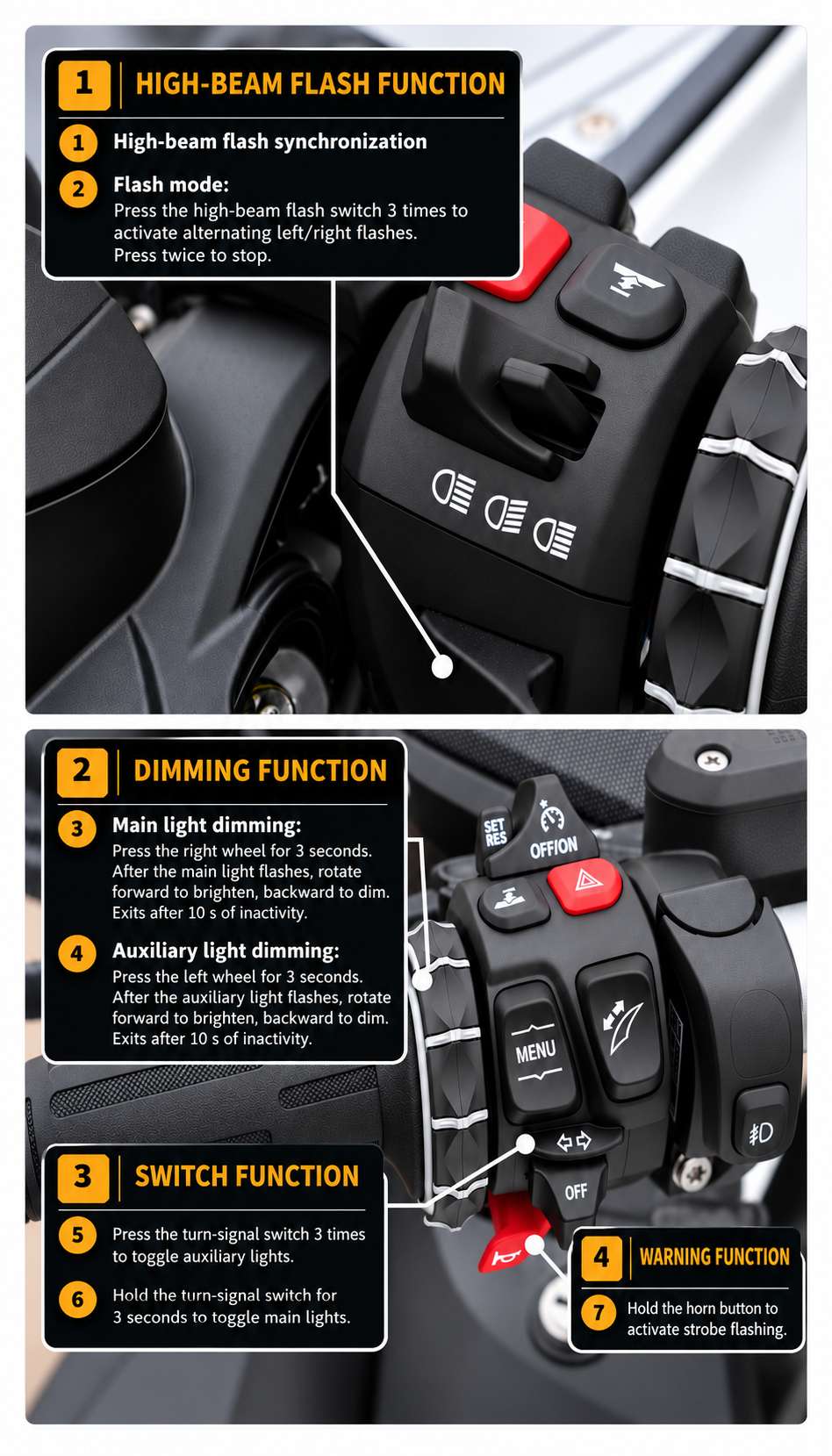
Switch the lights
Hold the turn-signal switch for 3 seconds to toggle the main lights. Press it 3 times to toggle the auxiliary lights.
Dim the main lights
Press the wheel to the right for 3 seconds. After the main lights flash, rotate forward to brighten or backward to dim. The adjustment exits after 10 seconds of inactivity.
Dim the auxiliary lights
Press the wheel to the left for 3 seconds. After the auxiliary lights flash, rotate forward to brighten or backward to dim. The adjustment exits after 10 seconds of inactivity.
High-beam flash
The V2 sheet lists high-beam flash synchronisation. Press the high-beam flash switch 3 times to activate alternating left/right flashes. Press twice to stop.
Horn warning function
Hold the horn button to activate strobe flashing.
LET’S GET YOU CONNECTED